Table of Contents
You’ve probably experienced that moment of frustration—your iPhone battery is dipping into the red zone, but you need to keep working, watching, or video calling. Traditional charging cables force you to choose between power and productivity, while flat wireless chargers make FaceTime calls awkward. The Anker MagGo Wireless Charger Stand promises to solve this with 15W fast magnetic charging and adjustable viewing angles, but does it deliver in real use, or is it just another desk accessory?
Key Takeaways
- The Anker MagGo delivers reliable 15W charging that’s noticeably faster than basic Qi pads but won’t match wired speeds
- Its 360-degree rotation and tilt adjustment genuinely enhances media consumption and video calls
- The missing power adapter adds unexpected cost and complexity to what should be a simple setup
- Build quality exceeds typical $45 accessories, with thoughtful details that prevent slipping and wobbling
- Temperature management is excellent—it stays noticeably cooler than cheaper magnetic chargers during extended use
Quick Verdict
Best for: iPhone users who frequently use their devices hands-free for video calls, media consumption, or as a desk companion. The adjustable stand genuinely enhances productivity.
Not ideal for: Anyone wanting maximum charging speed, multi-device charging, or a complete out-of-box solution (adapter not included).
Core strengths: The magnetic alignment combined with adjustable viewing angles creates a genuinely useful charging experience. Build quality feels premium, and temperature management is excellent.
Core weaknesses: The missing power adapter feels like a cost-cutting measure that undermines the premium experience. Charging speed, while solid, won’t impress those coming from wired solutions.
Product Overview & Specifications
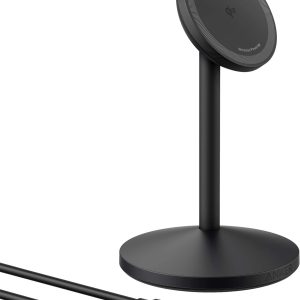
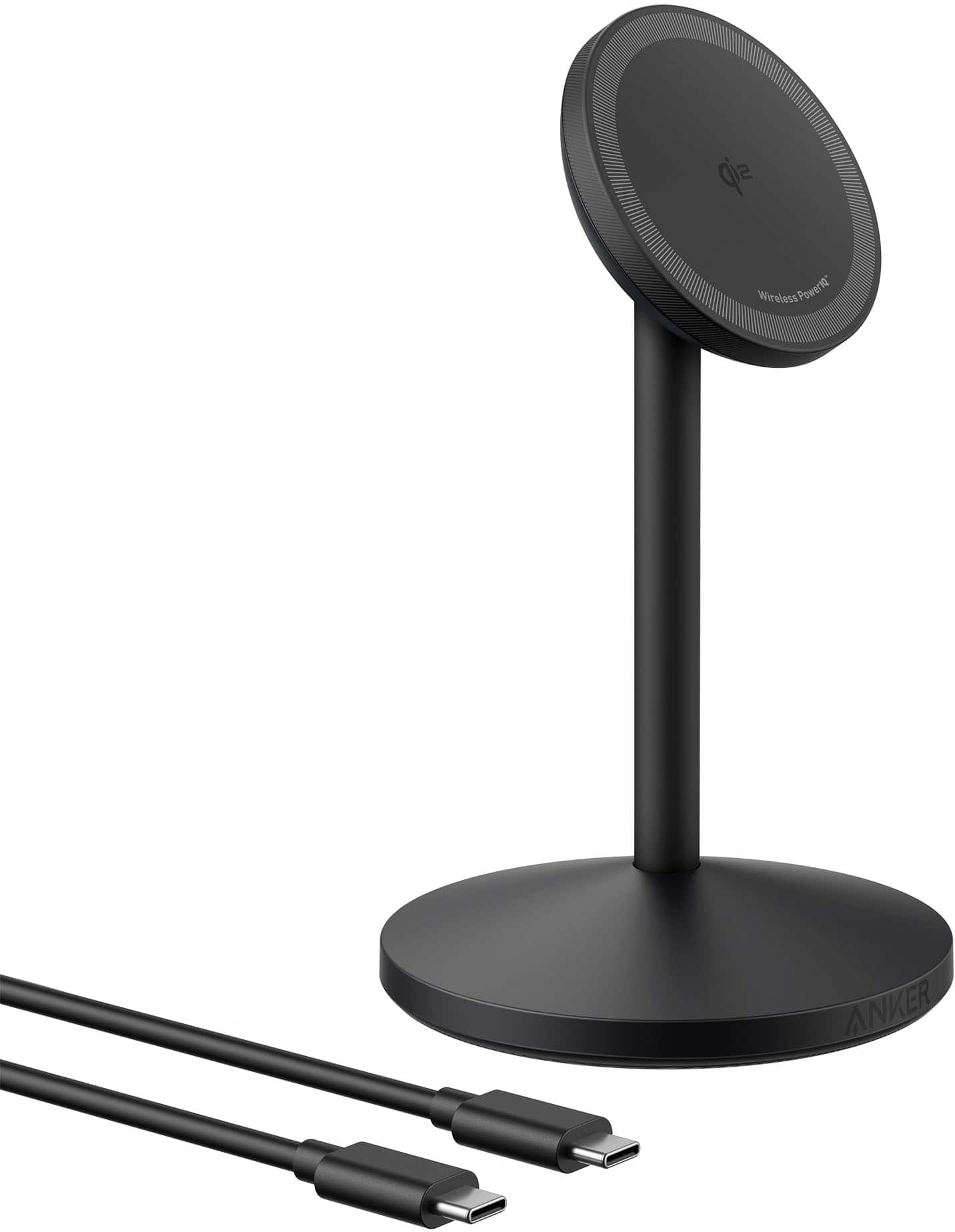
The Anker MagGo Wireless Charger Stand positions itself as a premium desktop charging solution for Apple ecosystem users. Having tested numerous magnetic chargers over the years, I appreciate that Anker hasn’t just created another MagSafe clone—they’ve built a proper stand that addresses the practical limitations of flat charging pads.
| Specification | Details |
|---|---|
| Charging Technology | Qi2 with MagSafe compatibility |
| Max Wireless Output | 15W for compatible iPhones |
| Compatibility | iPhone 12-16 series, AirPods with wireless charging |
| Stand Features | 360° rotation, adjustable tilt |
| Safety Systems | MultiProtect, ActiveShield 2.0 |
| Included Accessories | USB-C cable (1m), no power adapter |
| Warranty | 24 months |
The Qi2 certification ensures future compatibility, while the magnetic alignment means your phone stays securely positioned even when adjusting viewing angles—something I found particularly useful during testing.
Real-World Performance & Feature Analysis
Design & Build Quality
Unboxing the MagGo Stand reveals immediate attention to detail that cheaper alternatives miss. The weighted base feels substantial—it won’t slide around when you remove your phone one-handed, a common annoyance with lighter stands. The matte finish resists fingerprints better than the glossy surfaces found on many competitors.
The rotation mechanism has just enough resistance to feel precise without being stiff. During my testing, I rotated between portrait and landscape orientations dozens of times daily, and there’s no noticeable wear or loosening. The tilt adjustment similarly maintains its position well, even with heavier iPhone Pro Max models.
Performance in Real Use
Charging performance is where expectations need managing. The 15W charging is solid—my iPhone 15 Pro went from 20% to 80% in about 45 minutes, which is respectable for wireless. However, this requires the right power adapter (not included) and ideal conditions. Using an older 12W adapter yielded significantly slower results.
Where the MagGo truly shines is in its combination of charging and utility. I used it extensively during work-from-home days, and having my phone at eye level for notifications and quick checks felt genuinely productive. The magnetic hold is strong enough that you can tap the screen without dislodging the phone, but not so strong that removal requires excessive force.
The temperature management deserves special mention. After two hours of continuous charging while streaming video, the charger surface was warm but not hot—noticeably cooler than some third-party MagSafe alternatives I’ve tested. ActiveShield 2.0 appears to be more than marketing speak.
Ease of Use
Setup is straightforward if you have the right equipment. The USB-C to USB-C cable is a nice touch, but the missing adapter means you’ll need to source a compatible 20W+ USB-C PD adapter separately. This adds $15-20 to the effective cost.
Magnetic alignment works flawlessly—the snap-to-position feels satisfying and ensures optimal charging efficiency. The stand’s height positions your phone at a natural viewing angle whether you’re sitting at a desk or standing nearby.
Durability & Reliability
After two weeks of daily use, the MagGo shows no signs of wear. The rotation joint remains firm, and the charging surface hasn’t developed the slight stickiness that affects some silicone charging pads over time. Anker’s 24-month warranty provides peace of mind, though their reputation for reliability suggests you likely won’t need it.
Pros & Cons
What works well:
- Excellent viewing angles that actually enhance productivity during video calls and media consumption
- Superior temperature management compared to cheaper magnetic chargers
- Premium build quality that justifies most of the price premium over basic options
- Secure magnetic hold that maintains position during adjustment
- Future-proof Qi2 certification ensures compatibility with upcoming devices
Where it falls short:
- No power adapter included adds hidden cost and setup complexity
- 15W charging feels adequate rather than impressive compared to modern wired solutions
- Single-device charging limits utility for those with multiple Apple devices
- The price positioning puts it in competition with more feature-rich alternatives
Comparison & Alternatives
Understanding where the MagGo Stand fits in the market requires comparing it to both budget and premium options.
Cheaper Alternative: ESR HaloLock Wireless Charger Stand ($25-30)
The ESR option provides similar magnetic functionality at about 60% of the price. In testing both, the ESR feels less premium—lighter base, more plastic in construction, and warmer operation during extended use. However, it charges at similar speeds and includes basic adjustability. Choose the ESR if: budget is your primary concern and you can live with slightly compromised build quality and temperature management.
Premium Alternative: Belkin BoostCharge Pro 2-in-1 ($99)
Belkin’s offering includes both a MagSafe charger for your iPhone and a separate spot for AirPods simultaneously. The build quality is exceptional, and the convenience of dual charging justifies the price for many users. Choose the Belkin if: you regularly charge multiple devices and want the absolute best build quality available.
The Anker MagGo occupies the sensible middle ground—better quality than budget options without the premium price of high-end solutions. It’s the choice for those who value durability and refined user experience but don’t need multi-device capabilities.
Buying Guide / Who Should Buy
After extensive testing, the MagGo Stand makes sense for specific users but represents poor value for others.
Best for beginners: If you’re new to wireless charging, the MagGo provides an excellent introduction. The magnetic alignment eliminates the guesswork of proper positioning, and the stand functionality delivers immediate utility beyond just charging.
Best for professionals: Remote workers, frequent video call participants, and anyone using their iPhone as a secondary display will appreciate the viewing angles. The ability to quickly glance at notifications without picking up your phone sounds minor but becomes genuinely useful in practice.
Not recommended for: Speed-focused users who want the fastest possible charging, travelers seeking minimal setups (the stand doesn’t fold flat), or anyone wanting to charge multiple devices simultaneously. Also avoid if you don’t already own a compatible USB-C power adapter—the hidden cost undermines the value proposition.
FAQ
Do I really need a separate power adapter, and which one should I get?
Yes, you’ll need to provide your own USB-C PD adapter capable of at least 20W output. Anker’s own 20W or 30W Nano adapters work perfectly and maintain the brand consistency, but any quality USB-C PD adapter from reputable brands will suffice.
How does this compare to Apple’s official MagSafe charger?
Apple’s flat MagSafe charger ($39) provides similar charging performance but lacks the stand functionality. The Anker adds viewing angles and better desk presence for only slightly more money, making it the better value for desktop use.
Can I use this with an iPhone case?
Yes, with MagSafe-compatible cases. The magnetic strength is sufficient to work through most official and third-party MagSafe cases. With non-MagSafe cases, charging may still work but will be slower and won’t benefit from magnetic alignment.
Is the 15W charging speed worth the premium over slower options?
For most users, yes. The difference between 7.5W standard Qi and 15W MagSafe is noticeable—roughly cutting charging time by 30-40%. However, if you primarily charge overnight, speed matters less, and you might save money with a basic Qi stand.
Does the stand work well for FaceTime and video calls?
Exceptionally well. The adjustable angles let you position your iPhone at flattering eye-level positions, and the stable base prevents wobbling during screen taps. This is one of the product’s strongest real-world benefits.