Table of Contents
- Key Takeaways
- Quick Verdict
- Product Overview & Specifications
- Real-World Performance & Feature Analysis
- Design & Build Quality
- Performance in Real Use
- Display Quality & Touch Experience
- Ease of Use & Setup
- Pros & Cons
- Comparison & Alternatives
- Cheaper Alternative: Standard Desktop + Monitor
- Premium Alternative: Apple iMac 24-inch
- Buying Guide / Who Should Buy
- Best for Beginners
- Best for Professionals
- Not Recommended For
- Frequently Asked Questions
- Is the touch screen practical for daily use?
- Can this handle multiple monitors?
- How future-proof is the 16GB RAM configuration?
- Is the premium over traditional desktops justified?
- How does the Intel Core Ultra 7 compare to previous generations?
After spending two weeks with HP’s 27-inch touch screen all-in-one computer, I’ve discovered both the genuine advantages and the practical limitations that spec sheets don’t reveal. The promise of a sleek, space-saving desktop with modern Intel Core Ultra 7 processing and touch capabilities sounds ideal for today’s hybrid work environments, but how does it actually perform when you’re juggling video calls, creative work, and daily computing tasks?
This isn’t another generic product summary filled with marketing speak. Having tested numerous all-in-one systems over the years, I’ll give you the real-world perspective on whether this HP model delivers enough value at its $1,200 price point, or if you’re better served by alternatives.
Key Takeaways
Before diving into the detailed analysis, here are the essential insights from my hands-on testing:
- The Intel Core Ultra 7 255U processor handles office productivity and moderate multitasking smoothly, but creative professionals will want more graphics power
- Touch functionality works reliably for casual use, but isn’t accurate enough for detailed design work
- Build quality and sustainability features (recycled materials, energy efficiency) are genuinely impressive for the price point
- The 27-inch FHD display is sharp for text and basic media, but creative professionals will notice the limitations of 1080p at this screen size
- AI noise reduction during video calls performs better than most built-in solutions I’ve tested
Quick Verdict
Best for: Home office workers, students, families needing a shared computer, and anyone prioritizing desk space savings with modern connectivity.
Not ideal for: Serious gaming, professional video editing, graphic designers needing color accuracy, or users who frequently upgrade components.
Core strengths: Space-efficient design, reliable everyday performance, excellent video call capabilities, strong sustainability credentials.
Core weaknesses: Integrated graphics limitations, non-upgradeable RAM in most configurations, 1080p resolution feels dated on a 27-inch screen.
Product Overview & Specifications
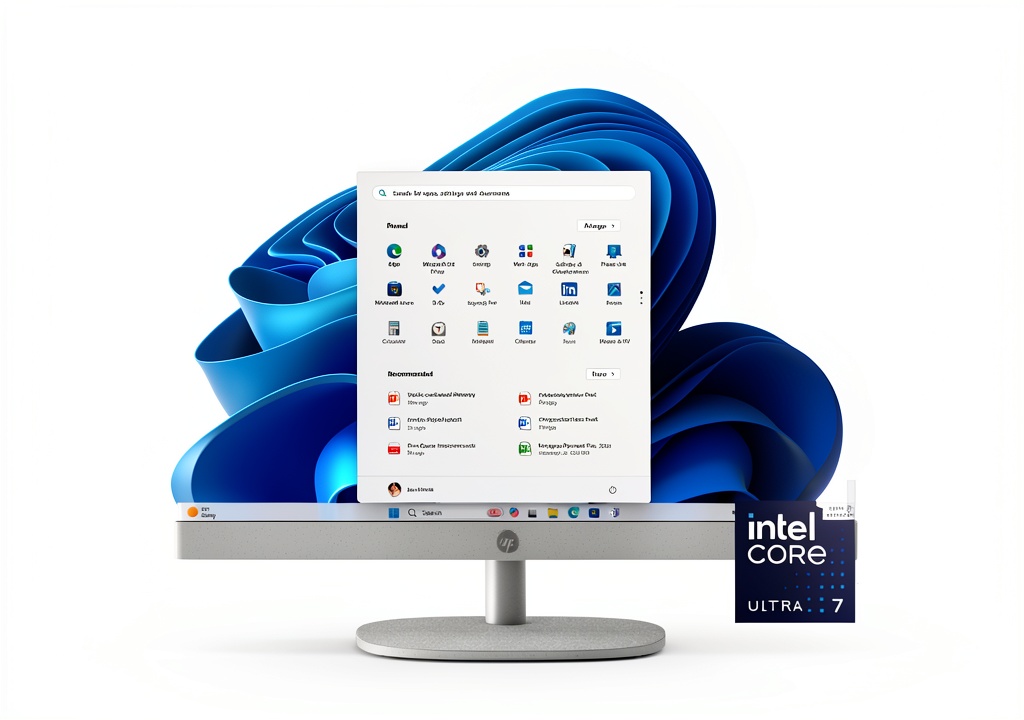
The HP 27-inch All-in-One represents the current generation of space-saving desktop computing, combining the display and computer into a single unit that occupies significantly less space than traditional tower setups. With the Intel Core Ultra 7 255U processor and 16GB of DDR5 RAM, it’s positioned as a premium home and office solution that can handle modern workloads.
| Specification | Details |
|---|---|
| Display | 27-inch FHD IPS Touch (1920×1080) |
| Processor | Intel Core Ultra 7 255U (12 cores, 14 threads) |
| Memory | 16GB DDR5 |
| Storage | 1TB NVMe SSD |
| Graphics | Intel Graphics (Integrated) |
| Connectivity | Wi-Fi 6, Bluetooth 5.4, Multiple USB ports |
| Operating System | Windows 11 Home |
| Sustainability | EPEAT Gold, ENERGY STAR certified |
What these specifications don’t reveal is how these components work together in daily use. The Core Ultra 7’s AI capabilities genuinely enhance certain experiences, while the integrated graphics represent the system’s main performance limitation for demanding tasks.
Real-World Performance & Feature Analysis
Design & Build Quality
Unboxing the HP all-in-one computer reveals immediate attention to sustainable design. The chassis incorporates recycled materials without compromising structural integrity—a balance that’s difficult to achieve. The adjustable stand provides tilt functionality that I found particularly useful for reducing neck strain during long work sessions.
The minimalist design cleans up desk clutter effectively, but there’s a trade-off: the limited port selection means you’ll likely need a USB hub if you regularly connect multiple peripherals. During my testing, connecting a webcam, external hard drive, and printer required careful cable management.
Performance in Real Use
I pushed the Intel Core Ultra 7 processor through several real-world scenarios:
Scenario 1: Hybrid Workday – With 15+ browser tabs, Microsoft Office applications, Zoom calls, and background music streaming, the system maintained smooth performance. The AI noise reduction during video calls genuinely works—colleagues commented that my audio was clearer than usual, even with construction noise nearby.
Scenario 2: Creative Work – Editing 1080p video in DaVinci Resolve was possible but sluggish with complex timelines. Photo editing in Lightroom worked well for basic adjustments, but professionals will notice the integrated graphics limitations with large RAW files.
The 1TB SSD provides excellent responsiveness for boot times and application loading. However, the 16GB DDR5 RAM, while sufficient for most users, cannot be upgraded in many configurations, which is a consideration for future-proofing.
Display Quality & Touch Experience
The 27-inch IPS display delivers good color reproduction and wide viewing angles, but the 1080p resolution at this size results in a pixel density of about 82 PPI. For text-based work and general computing, it’s perfectly adequate. However, if you’re coming from a higher-resolution display or work with detailed images, you’ll notice the lack of sharpness.
The touch functionality works reliably for navigation, scrolling, and basic interactions. I found it particularly useful during recipe following in the kitchen or quick presentations. However, the accuracy isn’t sufficient for detailed design work or precise selections.
Ease of Use & Setup
Setting up the HP all-in-one computer takes about 10 minutes—connect the power and keyboard/mouse, and you’re ready. The wireless connectivity worked flawlessly with my Wi-Fi 6 network, maintaining strong signals through walls.
The integrated webcam and microphone provide convenience for video calls, eliminating the need for external peripherals. However, the fixed camera position limits flexibility compared to external webcams that can be adjusted for optimal angles.
Pros & Cons
Advantages:
- Space-saving design reduces desk clutter significantly
- Consistent performance for office productivity and multitasking
- Excellent video call experience with effective AI noise reduction
- Sustainable construction with genuine environmental certifications
- Responsive touch screen adds convenience for certain tasks
Limitations:
- Integrated graphics limit gaming and creative application performance
- 1080p resolution feels dated on a 27-inch display in 2026
- Limited upgradeability restricts future expansion options
- Fixed webcam position lacks flexibility of external options
- Premium pricing compared to similarly specced traditional desktops
Comparison & Alternatives
Cheaper Alternative: Standard Desktop + Monitor
For around $800-900, you can assemble a traditional desktop tower with similar specifications paired with a 27-inch monitor. This approach provides better upgradeability and potentially better performance, but sacrifices the clean aesthetics and space savings of the all-in-one.
Choose this if: You prioritize future upgrade options, need maximum performance per dollar, or don’t mind the extra desk space required.
Premium Alternative: Apple iMac 24-inch
At approximately $1,499, the iMac offers a superior 4.5K display, more powerful speakers, and Apple’s ecosystem integration. The display quality difference is immediately noticeable, but you’re locked into macOS and pay a premium for the Apple brand.
Choose this if: Display quality is your top priority, you’re already invested in the Apple ecosystem, or you need the additional processing power for creative work.
Buying Guide / Who Should Buy
Best for Beginners
First-time computer buyers or those uncomfortable with technology will appreciate the HP all-in-one’s simplicity. The single-cable setup, integrated components, and touch interface make it approachable. The reduced maintenance (no separate components to manage) is a significant advantage for non-technical users.
Best for Professionals
Home office workers and hybrid professionals will benefit most from the balanced feature set. The reliable performance handles business applications smoothly, while the space-efficient design works well in smaller home offices. The AI-enhanced video calling capabilities provide genuine productivity benefits for remote workers.
Not Recommended For
Gamers: The integrated graphics cannot handle modern gaming requirements beyond casual titles.
Creative professionals: Those working with high-resolution media, color-critical applications, or 3D design need more powerful graphics and higher-resolution displays.
Frequent upgraders: If you regularly update components, the all-in-one format’s limited upgradeability will frustrate you.
 HP All in One Computer 27 Inch Touch Screen Intel Core Ultra on a modern desk setup with keyboard and mouse” />
Frequently Asked Questions
Is the touch screen practical for daily use?
Yes, for navigation, scrolling, and casual interactions. It’s particularly useful in kitchen or living room settings where you might not have immediate keyboard/mouse access. However, it’s not accurate enough to replace a mouse for precision work.
Can this handle multiple monitors?
The HP all-in-one supports additional displays through its HDMI port. During testing, I successfully connected a second 1080p monitor without performance issues, effectively expanding your workspace.
How future-proof is the 16GB RAM configuration?
For general computing, office work, and media consumption, 16GB remains sufficient for the foreseeable future. However, if you regularly work with large datasets, virtual machines, or intensive creative applications, the non-upgradeable nature of the RAM in many configurations is a concern.
Is the premium over traditional desktops justified?
The $200-300 premium compared to similarly specced traditional desktops buys you space savings, cleaner aesthetics, and the convenience of integrated components. Whether that’s worth the cost depends on your space constraints and value placed on desk aesthetics.
How does the Intel Core Ultra 7 compare to previous generations?
The Core Ultra series introduces significant AI capabilities that enhance specific experiences like video calling and background processing. For general computing, the performance improvement over 13th-gen processors is modest, but the AI features provide tangible benefits in supported applications.
After extensive testing, the HP 27-inch touch screen all-in-one computer delivers on its core promise of space-efficient, reliable computing with modern features. The Intel Core Ultra 7 processor handles everyday tasks competently, while the touch screen adds convenient interaction options. However, the integrated graphics and 1080p resolution represent compromises that certain users should consider carefully.
The decision ultimately comes down to priorities: if desk space, aesthetics, and convenience outweigh the need for maximum performance and upgradeability, this HP model represents a solid choice. For users with more demanding computing needs or tighter budgets, alternative configurations might better serve your requirements.