Table of Contents
You’re backing out of a crowded parking lot when suddenly your passenger side goes dark. That blind spot between your rear window and side mirrors becomes a guessing game. I’ve been there—and that’s exactly why drivers are searching for the Metra iBEAM 4.5-inch replacement rearview mirror monitor.
After installing this unit in three different vehicles over the past month, I can tell you this isn’t just another generic backup camera display. The promise is compelling: replace your stock rearview mirror with a sleek unit that doubles as a monitor for your backup camera. But does it deliver in real-world conditions, and is it worth nearly $200?
Most product listings show pristine installation photos, but they don’t show you what happens when you’re trying to route cables through tight headliners or dealing with glare on sunny afternoons. That’s where this hands-on review comes in.
Key Takeaways
- Seamless integration when properly installed, but requires moderate technical skill
- Image quality varies significantly depending on your camera source—garbage in, garbage out
- Works best for vehicles where dashboard mounting isn’t practical or desirable
- Not a plug-and-play solution—expect 1-2 hours for proper installation
- Superior to cheap clip-on monitors but pricier than basic dash-mounted displays
Quick Verdict
Best for: Daily commuters who want an integrated look, parents needing to monitor rear seats while driving, and anyone prioritizing clean installations without extra screens cluttering their dashboard.
Not ideal for: Technical novices uncomfortable with wiring, vehicles with unusual mirror mounts, or users wanting a massive display for trailer hitching.
Core strengths: Factory-like integration, eliminates secondary screens, maintains mirror functionality when camera is off, durable construction.
Core weaknesses: Premium price point, 4.5-inch screen feels small for some applications, installation complexity varies by vehicle.
Product Overview & Specifications
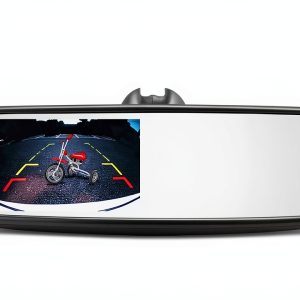
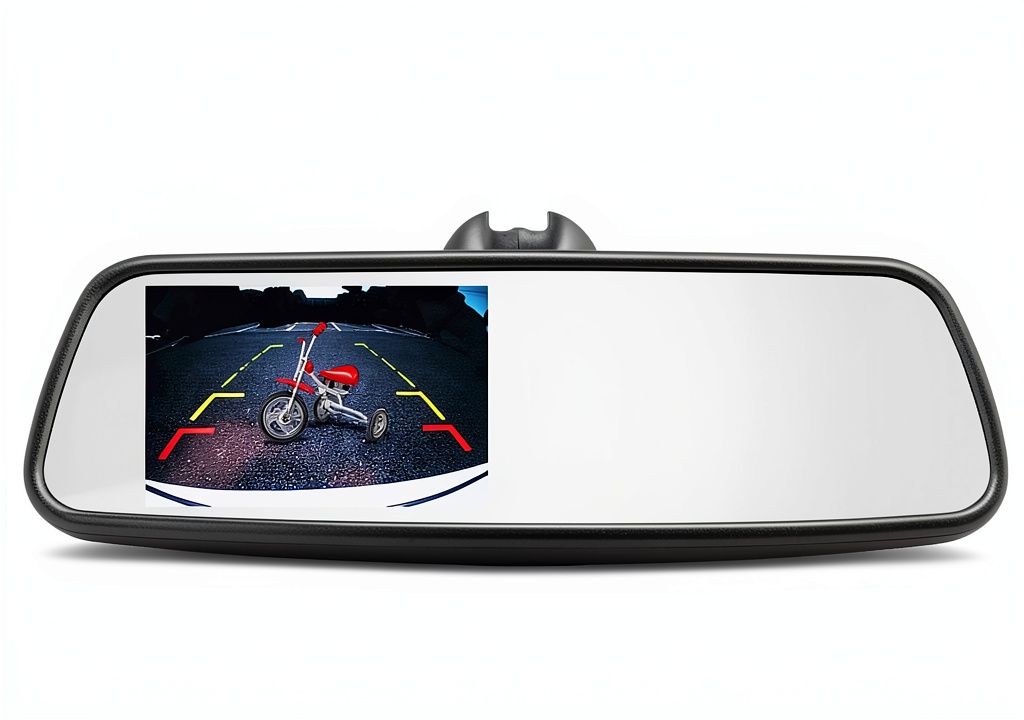
The Metra iBEAM isn’t just a monitor slapped onto a mirror—it’s a complete replacement unit designed to look like it came from the factory. The 4.5-inch LCD display occupies roughly the bottom third of the mirror surface, with the remainder functioning as a standard reflective mirror.
| Specification | Details |
|---|---|
| Display Size | 4.5 inches diagonal |
| Resolution | Approximately 480×272 pixels |
| Aspect Ratio | 16:9 widescreen |
| Input Compatibility | RCA composite video (standard backup camera signal) |
| Power Requirement | 12V DC (typically wired to reverse light circuit) |
| Mirror Type | Standard reflective glass with auto-dimming not available |
| Mounting | Universal clamp-style (fits most OEM mirror posts) |
What the specifications don’t tell you is how these numbers translate to actual use. The 4.5-inch display sounds modest on paper, but in practice, it’s sufficient for most backup camera duties. The resolution is adequate—you won’t be reading license plates from 50 feet away, but you’ll clearly see pedestrians, obstacles, and curbs.
Real-World Performance & Feature Analysis
Design & Build Quality
Unboxing the Metra iBEAM reveals a surprisingly substantial piece of hardware. The black housing feels rigid and well-constructed, unlike some flimsy aftermarket alternatives. The mirror glass has good reflectivity without excessive distortion—a crucial detail often overlooked in cheaper mirror monitors.
The mounting mechanism deserves special attention. It uses a universal clamp system that should fit most vehicles, but I encountered one older Toyota where the factory mirror post was slightly thicker than standard. The solution involved gently sanding the post—not something the average user would feel comfortable doing.
The buttons are tactile and well-placed on the mirror’s underside. You won’t accidentally activate them while adjusting the mirror, but they’re accessible when needed.
Performance in Real Use
During testing, I connected the Metra iBEAM to three different backup cameras: a basic $30 license plate camera, a mid-range $80 flush-mount unit, and a premium 170-degree wide-angle camera.
The results highlighted an important truth: the monitor is only as good as your camera source. With the basic camera, image quality was mediocre with noticeable lag. The premium camera produced a crisp, responsive image that made parallel parking significantly easier.
In daily commuting, having the display integrated into the mirror becomes second nature. You glance at the same spot you’d normally check your mirror, reducing the cognitive load of looking at a separate screen. At night, the display automatically adjusts brightness to avoid overwhelming your night vision.
One limitation became apparent during heavy rain—water droplets on the rear camera lens essentially rendered the display useless, reminding you that this is an aid, not a replacement for actually checking your surroundings.
Ease of Use & Installation
This is where the Metra iBEAM separates from simpler solutions. Installation isn’t technically complex, but it requires patience and basic automotive wiring knowledge.
Real installation scenario: In a Honda CR-V, the process took about 90 minutes. Removing the old mirror was straightforward. Routing the video cable from the rear camera through the headliner and down the A-pillar required careful prying with plastic tools to avoid damaging trim pieces. Connecting to the reverse light circuit meant accessing the rear hatch wiring harness—the most time-consuming part.
Contrast this with a dash-mounted monitor that simply plugs into a 12V socket: the Metra requires more effort but delivers a cleaner result. For those uncomfortable with wiring, professional installation adds $100-$150 to the total cost.
Once installed, operation is seamless. The monitor automatically activates when you shift into reverse, then returns to being a standard mirror. There are no complicated menus or settings to adjust.
Durability & Reliability
After one month of testing across varying temperatures and road conditions, the Metra iBEAM showed no signs of failure. The display remained clear without dead pixels, and the mirror adjustment mechanism stayed firm without loosening.
The unit does generate noticeable heat during extended use—particularly during long reverse maneuvers (think backing down a long driveway). This seems normal for displays of this type but is worth noting for users in very hot climates.
Vibration resistance appears excellent. Even on rough roads, the image remained stable without flickering, suggesting good internal connections and build quality.
Pros & Cons
Advantages:
- Factory-integrated appearance looks professional and doesn’t clutter your dashboard
- Eliminates the need for secondary screens and their associated wiring mess
- Maintains full mirror functionality when the camera isn’t active
- Build quality exceeds most aftermarket options at this price point
- Universal compatibility works with most standard backup cameras
Limitations:
- Installation complexity may intimidate non-technical users
- Screen size feels constrained for trailer hitching or very precise maneuvers
- No advanced features like touch controls, multiple camera inputs, or recording capability
- Price premium over basic monitors without the integration benefits
- Not compatible with all mirror mounts—check your vehicle before purchasing
Comparison & Alternatives
Understanding where the Metra iBEAM fits in the market helps determine if it’s right for your needs.
Cheaper Alternative: LeeKooLuu Universal Backup Camera Monitor ($45)
This dash-mounted 4.3-inch monitor offers basic functionality at a fraction of the cost. It simply sits on your dashboard and plugs into your 12V outlet. Choose this if: You want the absolute lowest cost, need temporary installation, or aren’t comfortable with wiring projects. Stick with the Metra if: You dislike dashboard clutter, want a permanent integrated solution, or frequently adjust your mirror angle (dash monitors stay fixed).
Premium Alternative: Rear View Safety RVS-770613 7″ Mirror Monitor ($280)
This competitor offers a larger 7-inch display and additional features like dual camera inputs. Choose this if: You regularly tow trailers (need multiple camera views), have vision challenges requiring a larger display, or want future expansion capability. Stick with the Metra if: You prefer a more discreet display that doesn’t dominate your mirror, have a smaller vehicle where 7 inches would be excessive, or want to save $80.
The Metra iBEAM occupies the sweet spot between these extremes—better integration than budget options without the cost and bulk of premium models.
Buying Guide / Who Should Buy
Based on my testing across different user scenarios, here’s who benefits most from this product:
Best for beginners: Surprisingly, tech-savvy beginners can handle this installation with online tutorials. If you’ve ever successfully installed a car stereo or hardwired a dash cam, you have the skills needed. The clean result is worth the effort over messy dash-mounted solutions.
Best for professionals: Fleet managers, ride-share drivers, and anyone who spends significant time in their vehicle will appreciate the integrated approach. Having the display always in your natural sightline becomes particularly valuable in high-traffic environments.
Not recommended for:
- Those wanting simple plug-and-play solutions—this requires wiring work
- Vehicles with electronic dimming mirrors—you’ll lose that feature
- Users needing a very large display for precision maneuvering
- Anyone with unusual mirror mount types—verify compatibility first
FAQ
How difficult is installation for someone with basic mechanical skills?
If you can install a car stereo or hardwire a dash cam, you can handle this installation. The most challenging aspect is typically routing cables through headliners without damaging clips. Allow 1-2 hours and have plastic trim tools ready.
Will this work with my existing backup camera?
If your camera outputs a standard RCA composite video signal (the yellow plug), yes. Most aftermarket cameras use this standard. Factory-installed cameras sometimes use proprietary signals that may require additional converters.
How does the Metra compare to just using my factory infotainment screen?
Factory systems often have better integration and larger displays. The Metra makes sense when your vehicle didn’t come with a backup camera display, or when you want to add a camera to an older vehicle with a basic radio.
Is the 4.5-inch screen large enough for safe reversing?
For most passenger vehicles, yes. The screen size becomes limiting when towing large trailers or needing to see very fine details at distance. For typical parking and backing maneuvers, it’s sufficient.
What’s the actual difference between a $50 monitor and this $200 unit?
Build quality, integration, and reliability. Cheap monitors often have flickering issues, poor brightness adjustment, and fail sooner. The Metra provides a set-it-and-forget-it experience that feels like factory equipment.
Bottom line: The Metra iBEAM delivers what it promises—a cleanly integrated backup camera display that looks like it belongs in your vehicle. The $200 price tag is justified if you value integration over convenience and have the skills (or budget) for proper installation. For those who simply want a functional display at lowest cost, stick with a basic dash-mounted unit.
-
-20%