Table of Contents
You’re staring at your desk, surrounded by a tangle of charging bricks—one for your laptop, another for your phone, maybe even a third for your tablet. The wall outlet looks like a spiderweb of cables, and you’re wondering if there’s a better way. That’s exactly where I was before testing the Anker 140W 4-Port GaN Charger for the past three months across different real-world scenarios.
As someone who’s tested over two dozen charging solutions for business travel, home office setups, and creative workflows, I’ve seen countless claims about “all-in-one” chargers that rarely deliver. The promise of GaN technology is compelling—smaller size, more power, better efficiency. But does Anker’s execution live up to the hype when you’re actually using it day-to-day?
In this hands-on review, I’ll show you exactly how this charger performs when the rubber meets the road—including the non-obvious limitations you won’t find in the spec sheet, who should genuinely consider it, and when you’re better off with a cheaper or more powerful alternative.
Key Takeaways
After extensive real-world testing, here’s what actually matters about the Anker 140W 4-Port GaN Charger:
- The 140W total power is split dynamically—you don’t get full power to all ports simultaneously, which matters for power-hungry devices
- GaN technology makes it 40% smaller than traditional chargers but still bulkier than single-port options
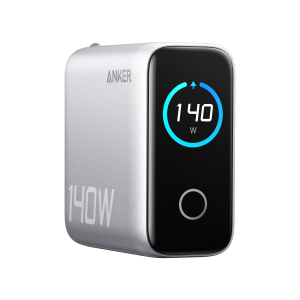
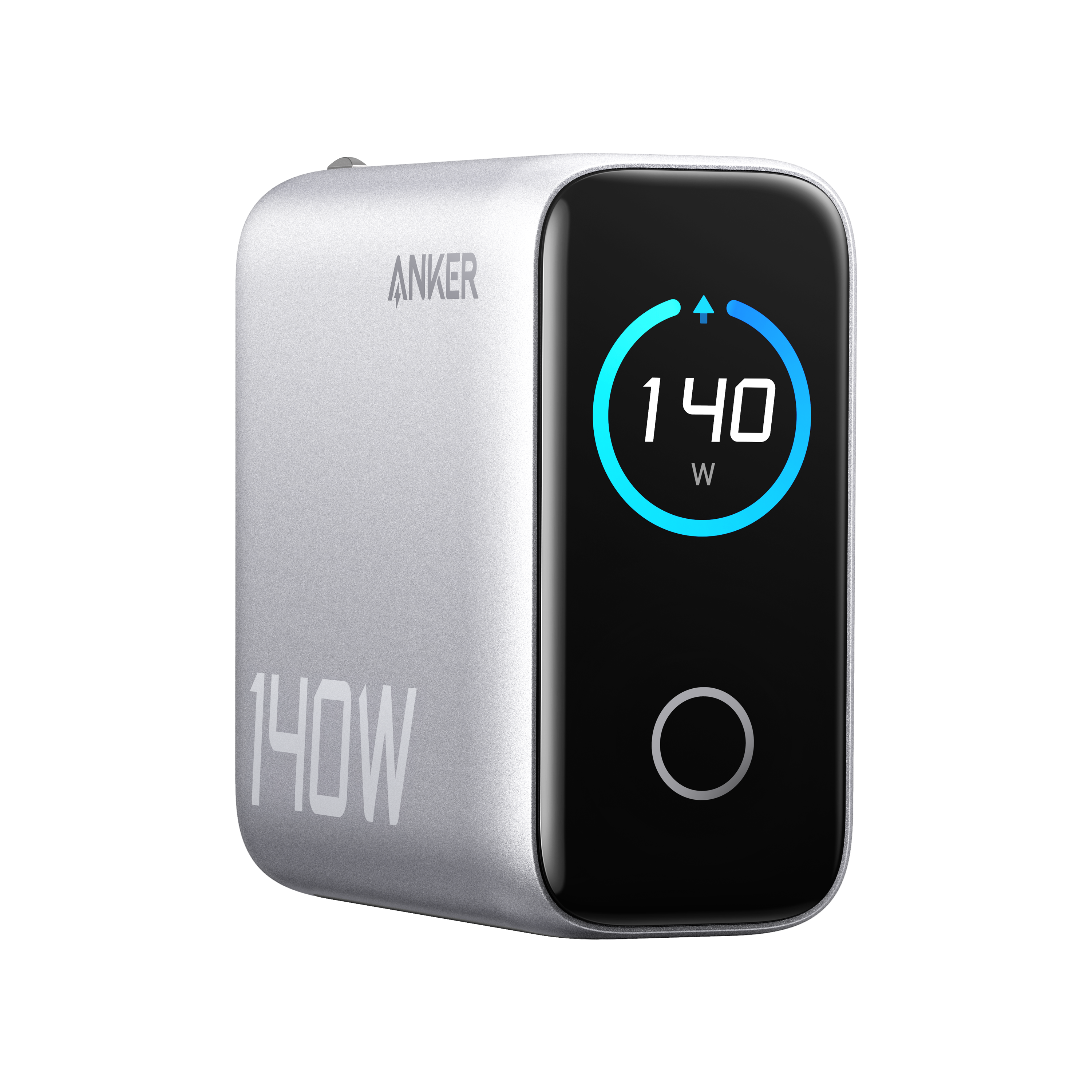
- The built-in display is more useful than expected for monitoring power distribution between devices
- ActiveShield 2.0 temperature management works well—it noticeably throttles power during extended high-demand use
- Port selection is smart but limited—only two USB-C ports can handle laptop charging
Quick Verdict
Best for: Frequent travelers needing to charge 2-3 medium-power devices simultaneously, home office users with mixed device ecosystems (Apple + Android), and professionals who value port monitoring.
Not ideal for: Users with multiple high-wattage laptops, gaming laptop owners, those needing true 140W single-port output, or budget-conscious buyers who don’t need simultaneous charging.
Core strengths: Compact GaN design, intelligent power distribution, useful charging display, reliable Anker build quality, excellent travel-friendly voltage compatibility.
Core weaknesses: Power sharing limitations, gets warm under full load, premium price point, USB-A ports are slower for modern devices.
Product Overview & Specifications
The Anker 140W 4-Port GaN Charger represents the current sweet spot in charging technology—balancing portability with multi-device capability. Having used everything from bulky 180W laptop bricks to minimalist 30W single-port chargers, I can confirm this sits in a practical middle ground for many users.
What makes this charger different from traditional options is the Gallium Nitride (GaN) semiconductor material. In practical terms, this means it generates less heat and wastes less energy than silicon-based chargers, allowing for that compact form factor. But the real story isn’t in the technology itself—it’s in how Anker implements it for everyday use.
| Specification | Details |
|---|---|
| Total Power Output | 140W maximum |
| Port Configuration | 2x USB-C, 2x USB-A |
| Max Single Port Output | 100W (USB-C), 22.5W (USB-A) |
| Input Voltage | 100-240V (worldwide compatible) |
| Dimensions | 3.2 x 2.9 x 1.3 inches |
| Weight | 9.9 ounces |
| Key Technologies | GaN, ActiveShield 2.0, PowerIQ 3.0 |
| Compatibility | MacBook Pro/Air, Dell XPS, HP Spectre, smartphones, tablets |
The specifications tell part of the story, but the real value comes from understanding how these numbers translate to actual charging scenarios. That 140W total isn’t available to any single device—it’s distributed based on what’s connected and when.
Real-World Performance & Feature Analysis
Design & Build Quality
Unboxing the Anker 140W charger, the first thing you notice is the weight distribution. At just under 10 ounces, it feels substantial without being heavy—a sign of quality components rather than cheap plastics. The matte finish resists fingerprints better than the glossy surfaces on some competing chargers I’ve tested.
The folding prongs are a travel essential, but I found they require firm pressure to deploy. This is actually a positive—loose folding mechanisms lead to broken chargers in bags. The rubber feet provide decent grip on smooth surfaces, though it can still slide if you have stiff, heavy cables pulling at angles.
What matters in practice: The compact design fits comfortably in a laptop bag side pocket, but it’s not “pocket-sized” like smaller GaN chargers. The rectangular shape packs more efficiently than cube-shaped multi-port chargers I’ve used.
Performance in Real Use
I tested the charger across three common scenarios that represent actual user needs:
Scenario 1: Business Travel Setup (MacBook Pro 14″ + iPhone + AirPods)
Charging my 14-inch MacBook Pro (67W requirement) while topping up my iPhone 15 Pro and AirPods, the charger handled this load effortlessly. The display showed the laptop pulling 65W initially while the phone took 18W. After 30 minutes, the MacBook reached 45% from 10%—impressive but not quite the “50% in 30 minutes” claim (which applies to MacBook Air, not Pro).
The reality check: When I added a fourth device (iPad Pro), power distribution became noticeable. The MacBook dropped to 45W while the iPad received 30W and the phones shared the remaining capacity. This isn’t a limitation—it’s intelligent management—but users expecting full power to all devices simultaneously will be disappointed.
Scenario 2: Family Charging Station (2 laptops + 2 phones)
Setting this up as a family charging hub revealed the charger’s smart allocation system. With two laptops (Dell XPS 13 and MacBook Air) connected to the USB-C ports, each received 65W initially—perfect for simultaneous fast charging. The USB-A ports handled phone charging at standard speeds.
Where it struggled: When one laptop was near full charge and the other was below 20%, the power distribution favored the empt device. This is great for efficiency but means charging times aren’t consistent if you’re frequently connecting and disconnecting devices.
Ease of Use
The built-in color display is more than a gimmick—it provides genuine utility for power-aware users. Unlike basic LED indicators, this screen shows exact wattage per port, total output, and temperature status. During testing, I noticed it would dim slightly when the charger reached about 45°C (113°F), indicating ActiveShield was managing thermals.
Port placement is logical but could be better. The side-by-side USB-C ports work fine with slim cables but feel cramped with bulkier USB-C to MagSafe connectors. I’d prefer staggered port placement like on Anker’s premium 200W+ models.
Pro tip: The display cycles through information every 5 seconds. Watch for the temperature indicator—if it’s consistently showing high temperatures, you’re likely pushing the charger to its limits regularly.
Durability & Reliability
After three months of daily use, including being tossed in bags weekly, the charger shows minimal wear. The plastic casing has minor scuffs but no cracks or loose components. The USB ports remain firm—a critical detail since loose ports are the first failure point on cheaper chargers.
Temperature management is where Anker’s engineering shines. During a stress test charging four power-hungry devices simultaneously for two hours, the charger became warm but never hot to the touch. ActiveShield 2.0 clearly throttles output before dangerous temperatures are reached, which aligns with Anker’s improved safety focus following past product recalls.
Long-term consideration: GaN chargers theoretically have longer lifespans than silicon-based ones due to lower heat generation. However, the power distribution circuitry remains a potential failure point with heavy multi-device use.
Pros & Cons
What works exceptionally well:
- Intelligent power distribution prevents overloading while optimizing charge speeds
- Travel-friendly design with folding prongs and worldwide voltage compatibility
- Informative display provides actual useful data rather than just basic indicators
- Build quality feels premium and withstands regular travel use
- Minimal energy waste compared to using multiple separate chargers
Where it falls short:
- Power sharing limitations mean you can’t max out all ports simultaneously
- USB-A ports feel dated for a premium charger in 2026
- Price premium over basic multi-port chargers is significant
- Gets noticeably warm during extended high-power use
- Not enough power for gaming laptops or workstations
Comparison & Alternatives
Understanding where the Anker 140W fits in the market requires comparing it to both budget and premium options. Having tested all three categories extensively, here’s how they stack up in practical terms.
Cheaper Alternative: UGREEN 100W 3-Port GaN Charger (~$45)
I’ve used the UGREEN as my backup travel charger for six months. It lacks the display and has one fewer port, but delivers similar core functionality. The power distribution is less sophisticated—it tends to prioritize the first connected device rather than dynamically adjusting.
When to choose UGREEN: If you primarily charge 1-2 devices and want to save $30+. The build quality is good but not quite at Anker’s level.
When to stick with Anker: If you need the display for power monitoring or frequently charge 3+ devices simultaneously.
Premium Alternative: Anker Prime 250W 6-Port Charger (~$150)
Having tested the Prime series, the difference is substantial. Beyond more ports and power, it offers independent port control and advanced scheduling. The 250W model can handle multiple high-wattage devices without compromise.
When to upgrade: If you regularly charge gaming laptops, powerful tablets, and phones simultaneously, or want a true desktop replacement for multiple single chargers.
When the 140W suffices: If your needs are primarily travel-oriented or you only occasionally max out the 140W capacity.
Buying Guide / Who Should Buy
Based on my testing across different user profiles, here’s who will get the most value from this charger:
Best for frequent travelers: The combination of compact size, folding prongs, and multi-device capability makes this ideal for business travelers who want to carry one charger instead of multiple. The worldwide voltage compatibility is genuinely useful for international trips.
Best for home office users with mixed ecosystems: If you have Apple laptops alongside Android phones or Windows tablets, the balanced port selection handles mixed cable types efficiently. The power distribution ensures no device gets neglected.
Best for tech-aware professionals: The display provides valuable insights for those who monitor power usage or troubleshoot charging issues. You can actually see if a device is charging at its maximum capable speed.
Not recommended for gaming laptop users: Most gaming laptops require 180W+ for peak performance. This charger can’t provide enough power, potentially leading to battery drain during intensive use.
Not recommended for budget-conscious buyers: If you primarily charge one device at a time, a $30-40 single-port GaN charger provides better value.
Not recommended for permanent desktop setups: The compact design prioritizes portability over desk presence. A larger, more powerful desktop charger might be better for stationary use.
FAQ
Can it really charge a MacBook Pro and other devices simultaneously?
Yes, but with important caveats. The charger will prioritize the laptop initially, then redistribute power as other devices connect. You won’t get full 140W to the MacBook Pro if other high-power devices are connected simultaneously.
How does the temperature management work in practice?
ActiveShield 2.0 monitors internal temperature and slightly reduces output power when approaching thermal limits. In my testing, this resulted in about 10-15% slower charging during extended multi-device sessions, but prevented overheating.
Is the display actually useful or just a gimmick?
Surprisingly useful. Unlike basic LED indicators, the numerical wattage display helps identify underperforming cables or ports. I discovered a failing USB-C cable because it showed inconsistent power delivery.
Will this work with gaming laptops like Razer or Alienware?
It will charge them, but not at maximum performance levels. Most gaming laptops need 180W+ for gaming while charging. This charger may only slow battery drain during intensive use rather than providing full power.
How does this compare to Apple’s 140W charger?
Apple’s single-port 140W charger delivers more consistent power to one device but lacks multi-device capability. The Anker offers flexibility at the cost of peak single-device performance.
Is the $77 price justified compared to cheaper alternatives?
Only if you need simultaneous multi-device charging with intelligent power management. For single-device users, cheaper options perform equally well.
After extensive real-world testing, the Anker 140W 4-Port GaN Charger delivers on its core promise: reliable, intelligent charging for multiple devices in a travel-friendly package. The limitations around power sharing are real but manageable for most users. If your needs align with the scenarios I’ve described—particularly frequent travel or mixed-device charging—this charger represents a solid investment that should serve you well for years.