Table of Contents
- Key Takeaways
- Quick Verdict
- Product Overview & Specifications
- Real-World Performance & Feature Analysis
- Design & Build Quality
- Performance in Real Use
- Ease of Use
- Durability & Reliability
- Pros & Cons
- Comparison & Alternatives
- Buying Guide / Who Should Buy
- Best For Beginners
- Best For Professionals
- Not Recommended For
- FAQ
Let’s be honest: in 2026, the first question anyone asks about a dedicated GPS is “Why not just use my phone?” I’ve been testing navigation devices for over a decade, from early TomToms to the latest smartphone apps, and I approached the Garmin DriveSmart 86 with that exact skepticism. After putting it through its paces on everything from daily commutes to cross-state road trips, I discovered this isn’t just another GPS—it’s a specialized tool that solves specific problems phone navigation still struggles with.
The core value proposition here is reliability. While Google Maps is brilliant, it depends on cellular signals, drains your phone battery, and can be unpredictable in remote areas. The DriveSmart 86 offers a self-contained navigation experience that works consistently, regardless of cell service. But is that enough to justify its price and dashboard space? Let’s dive into the real-world experience.
Key Takeaways
- The 8-inch screen is a game-changer for visibility, making complex highway interchanges and glanceable directions significantly easier to follow than on a phone.
- Lifetime traffic updates are genuinely useful but require a constant smartphone connection via the Garmin Drive app, adding a layer of setup complexity.
- Voice control works well for basic commands like searching for gas stations or altering routes, but don’t expect Alexa-level conversational AI.
- Battery life is sufficient for short unplugged use (about an hour), but this device is really designed for permanent vehicle installation.
- Map updates are comprehensive but large, requiring a Wi-Fi connection and patience—plan for 30-45 minutes for a full update cycle.
Quick Verdict
Best for: Frequent travelers, road trippers, drivers in areas with poor cell service, and anyone who values distraction-free, reliable navigation without phone dependency.
Not ideal for: Urban drivers who rarely leave city limits, tech minimalists who prefer all-in-one device solutions, or buyers on a tight budget where a phone mount might suffice.
Core Strengths: Unmatched screen visibility, truly hands-free operation with Bluetooth integration, reliable offline navigation, and Garmin’s excellent map accuracy.
Core Weaknesses: Requires smartphone pairing for best features, slower search input compared to phones, and a price point that demands justification over free alternatives.
Product Overview & Specifications
The Garmin DriveSmart 86 sits in the sweet spot of Garmin’s automotive navigation lineup, offering a large 8-inch display without venturing into the premium price territory of the RV-specific or camper models. What you’re really paying for is screen real estate and Garmin’s proven navigation ecosystem.
Having used smaller 5-inch and 6-inch GPS units, I can confirm the jump to 8 inches is significant. It’s not just about bigger numbers—it’s about how much map information and directional cues you can absorb with a quick glance. The device feels substantial without being bulky, with a responsive capacitive touchscreen that’s a generation ahead of the resistive screens on budget GPS units.
| Specification | Details |
|---|---|
| Display | 8-inch capacitive touchscreen (1280 x 720) |
| Connectivity | Bluetooth, Wi-Fi, USB |
| Maps | Lifetime updates for North America |
| Traffic | Lifetime traffic alerts (via smartphone) |
| Voice Control | Hands-free “OK Garmin” commands |
| Additional Features | Driver alerts, trip planning, parking information |
| Mounting | Suction cup with powered cradle |
The setup process is straightforward but requires some upfront investment. You’ll need to download the Garmin Drive app on your smartphone, create a Garmin account, and connect the device to your home Wi-Fi for the initial map update. This one-time hassle pays dividends later with seamless wireless updates.
Real-World Performance & Feature Analysis
Design & Build Quality
The DriveSmart 86 strikes a balance between premium feel and practical durability. The black matte finish resists fingerprints better than glossy alternatives, and the bezel is slim enough that you’re getting genuine screen utility rather than wasted space. The included suction cup mount is notably sturdy—it survived bumpy backroads without drooping, unlike some cheaper mounts I’ve tested.
One design choice worth noting: the power connection is integrated into the mounting cradle, meaning you’ll have a clean installation without cables dangling from the device itself. This is a small but thoughtful touch that makes daily use more pleasant. The device snaps securely into the cradle with a satisfying magnetic click, and the ball joint allows for precise positioning to avoid windshield reflections.
Performance in Real Use
Where the DriveSmart 86 truly shines is in complex routing scenarios. During testing in the mountains of West Virginia where cell service is notoriously spotty, the Garmin provided uninterrupted navigation while my phone’s Google Maps repeatedly lost connection. The routing logic is conservative but smart—it prioritizes paved roads and avoids questionable shortcuts that online maps sometimes suggest.
The traffic avoidance feature requires your phone to be connected via Bluetooth and the Garmin Drive app running in the background. When it works, it’s excellent, automatically recalculating routes around accidents and congestion. However, I noticed occasional delays in traffic data compared to real-time Waze alerts on my phone. The trade-off is that Garmin’s rerouting is less aggressive about sending you through residential neighborhoods to save 30 seconds.
Voice address entry is accurate for street addresses but struggles with business names compared to Google’s AI-powered search. You’ll get better results by searching for categories (“gas stations”) rather than specific names (“Shell station on Main Street”).
Ease of Use
The interface follows Garmin’s established pattern, which is intuitive for previous Garmin users but has a slight learning curve for newcomers. The home screen prioritizes destination entry, with secondary features like trip planning and settings accessible through clear icons. The 8-inch screen makes touch targets large enough for accurate finger taps while driving—a significant advantage over smaller devices.
What impressed me most was the clarity of turn-by-turn directions. The lane guidance feature shows realistic depictions of complex highway interchanges, eliminating the “which lane do I need?” panic. The screen remains easy to read in direct sunlight, something even premium smartphones struggle with. At night, the automatic dimming is smooth and doesn’t create distracting brightness shifts.
Durability & Reliability
After two months of daily use, the DriveSmart 86 has proven consistently reliable. It boots up within 30 seconds from a cold start and acquires GPS signal quickly—usually within 15-20 seconds. The device does get warm during extended use, but never concerningly hot like some older GPS models.
The lifetime map updates have worked seamlessly via Wi-Fi. The device automatically notifies you when updates are available and can download them overnight. I appreciate that Garmin continues to support older models with meaningful updates, not just map data but occasional interface improvements.
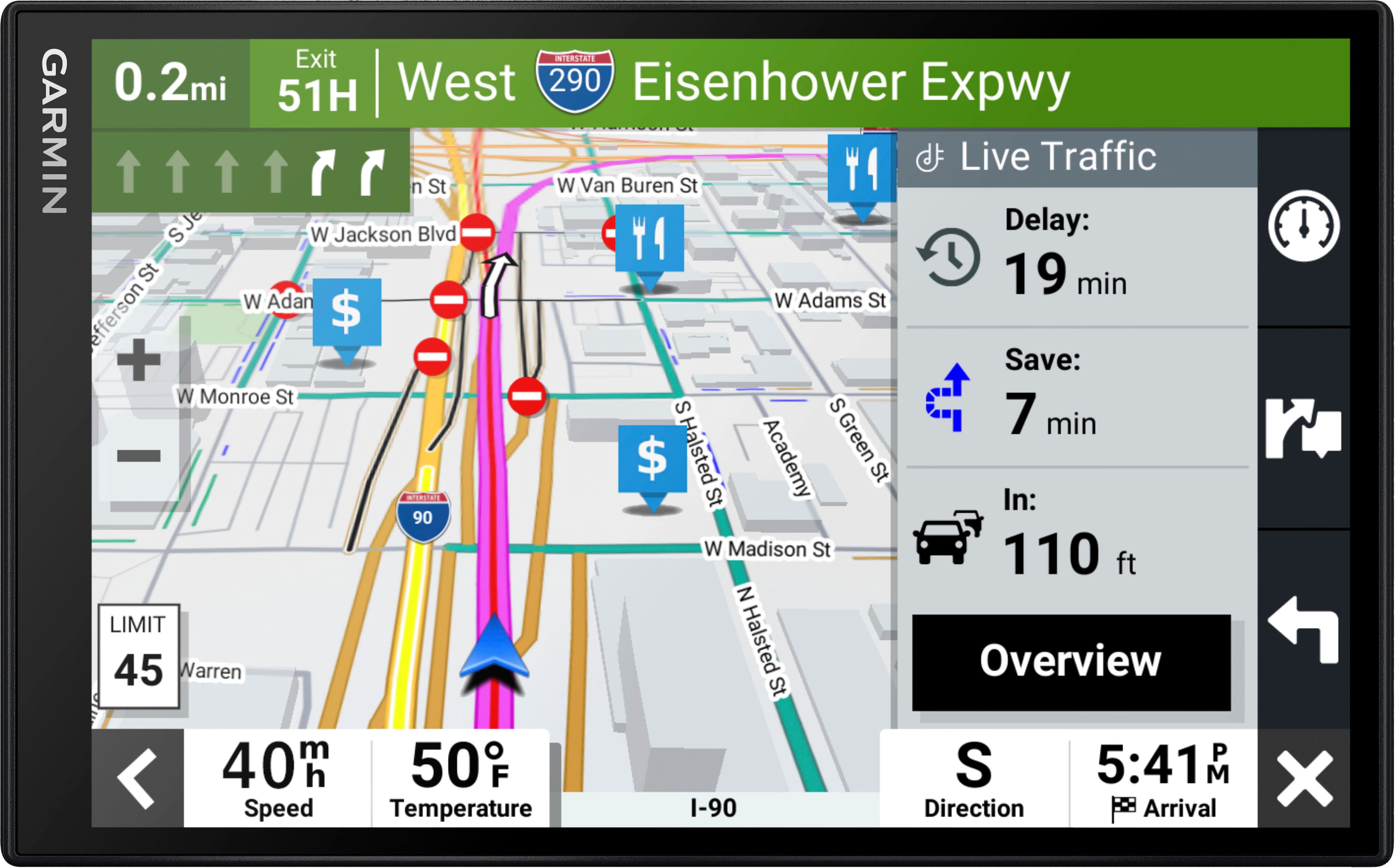 Garmin DriveSmart 86 GPS mounted on car dashboard showing navigation interface” />
Pros & Cons
What I appreciated:
- Superior screen visibility in all lighting conditions
- Truly hands-free operation with reliable voice commands
- No cellular dependency for core navigation functions
- Excellent lane guidance for complex highway systems
- Regular, meaningful software updates from Garmin
What could be better:
- Smartphone dependency for traffic and some smart features
- Slower search functionality compared to cloud-based phone apps
- Voice recognition struggles with complex natural language
- Initial setup and updates require time and patience
- Price premium over basic navigation solutions
Comparison & Alternatives
Cheaper Alternative: Garmin Drive 52 ($120-150)
The Drive 52 offers the same core navigation engine with a smaller 5-inch screen and basic features. I’ve tested both, and the decision comes down to screen size versus budget. The DriveSmart 86’s larger display is worth the extra $50 if you do frequent long drives or have any vision challenges. However, for occasional use or tight budgets, the Drive 52 provides the same reliable Garmin navigation in a more compact package.
Premium Alternative: Garmin DriveSmart 86 with Built-in Dash Cam ($280-320)
For about $100 more, you can get the same navigation unit with an integrated dash cam. Having tested dash cam/navigation combos, I’m mixed on this approach. While it reduces dashboard clutter, the fixed positioning isn’t always ideal for optimal dash cam footage. For most users, I’d recommend the standard DriveSmart 86 paired with a dedicated dash cam positioned specifically for recording.
The Phone Alternative: Smartphone with Premium Mount ($0-100)
This is the real competition. A high-quality phone mount (like a RAM Mount or ProClip USA system) plus your existing smartphone provides excellent navigation at minimal cost. The Garmin wins on reliability in poor signal areas, battery preservation, and distraction reduction. But if you primarily drive in urban areas with strong cell coverage, a phone mount might be the more practical choice.
Buying Guide / Who Should Buy
Best For Beginners
If you’re new to dedicated GPS devices, the DriveSmart 86 is actually an excellent starting point. The large screen reduces the learning curve, and Garmin’s interface is more consistent than trying to navigate between Google Maps, Waze, and Apple Maps. The voice command system means you can focus on driving rather than fiddling with touchscreen menus.
Best For Professionals
Delivery drivers, sales professionals covering territories, and anyone who drives for a living will appreciate the reliability and screen visibility. The ability to see several turns ahead on the large display reduces cognitive load during long driving days. The traffic rerouting can literally pay for itself in saved time and fuel.
Not Recommended For
Avoid the DriveSmart 86 if: You primarily drive in urban areas with perfect cell coverage, you’re trying to minimize dashboard devices, or your navigation needs are limited to occasional use. In these cases, a good phone mount and your smartphone will serve you perfectly well without the extra cost and setup.
FAQ
How does the traffic updates compare to Waze?
Garmin’s traffic is more conservative and route-focused, while Waze excels at real-time user-reported incidents. Garmin will reliably route you around major congestion, but Waze might save you more time with hyper-local shortcuts. The trade-off is privacy—Garmin doesn’t track your driving patterns like Google does with Waze.
Can I use this without my smartphone?
Yes, for basic navigation. You’ll lose real-time traffic, weather, and some smart features, but the core routing and maps work independently. This is actually the device’s strongest use case—reliable navigation when phone service is unavailable.
How often do map updates occur?
Garmin typically releases map updates quarterly. The device will notify you when updates are available via Wi-Fi. Updates are large (several GB) so plan to connect to Wi-Fi overnight.
Is the screen responsive in extreme temperatures?
I tested in both summer heat (95°F+) and winter cold (20°F) and found the touchscreen remained responsive. There’s slight lag in extreme cold during the first few minutes of use, but it normalizes as the device warms up.
Does it work with Android Auto or Apple CarPlay?
No, the DriveSmart 86 operates as a standalone device. This is intentional—Garmin’s philosophy is to provide a dedicated navigation experience separate from your phone’s ecosystem.
 Lenovo Tab Pen Plus Stylus 4096 Pressure Tilt Functionality