Table of Contents
- Key Takeaways
- Quick Verdict
- Product Overview & Specifications
- Real-World Performance & Feature Analysis
- Design & Build Quality
- Performance in Real Use: Beyond the Benchmarks
- The Touchscreen: Convenience or Gimmick?
- Ease of Use & Setup
- Durability & Reliability
- Pros & Cons
- Comparison & Alternatives
- Cheaper Alternative: Standard Desktop Tower with Monitor
- Premium Alternative: Apple iMac 24-inch with M3 Chip
- Buying Guide / Who Should Buy
- Best For Beginners & Non-Tech-Savvy Users
- Best For Professionals & Power Users
- Not Recommended For
- FAQ
You’re looking at an all-in-one desktop because you’re tired of the cable clutter and space consumption of a traditional tower PC. You need performance, but you also value a clean, modern workspace. The HP 27-inch Touchscreen All-in-One with an Intel Core Ultra 7 processor and a massive 32GB of RAM seems to promise exactly that: serious power in a sleek, minimalist package.
But here’s the reality check: not all all-in-ones are created equal. Many compromise on performance or upgradeability. As someone who has tested dozens of these systems in both corporate and home office environments, I know that specs on a page don’t always translate to a smooth experience. This review will cut through the marketing to show you where this HP model excels, where it falls short, and most importantly, whether it’s the right fit for your specific needs and budget.
Key Takeaways
- Exceptional Multitasking Performance: The Core Ultra 7 255U CPU and 32GB RAM handle dozens of browser tabs, office applications, and light creative work simultaneously without breaking a sweat.
- Truly ‘Plug-and-Play’ Simplicity: The included keyboard and mouse, along with Windows 11 pre-installed, mean you’re productive within minutes of unboxing.
- The Touchscreen is a Game-Changer for Certain Workflows: It’s surprisingly useful for presentations, quick navigation, and collaborative tasks, but it won’t replace a mouse for precision work.
- Limited Upgrade Path: Like most all-in-ones, what you buy is largely what you’re stuck with. The 2TB SSD is generous, but RAM and CPU are not user-upgradeable.
- Not a Gaming or High-End Creative Powerhouse: The integrated Intel Graphics are fine for everyday tasks and 4K video playback, but they’re not suited for serious gaming, 3D modeling, or intensive video editing.
Quick Verdict
Best for: Business professionals, power users in a home office, and anyone who values a clean desk setup and needs reliable performance for multitasking, data analysis, and general productivity.
Not ideal for: Hardcore gamers, professional video editors/3D animators, users who require frequent hardware upgrades, or those on a very tight budget.
Core Strengths: Seamless out-of-the-box experience, robust multitasking capabilities, high-quality 27-inch touch display, and extensive connectivity with USB-C.
Core Weaknesses: Non-upgradeable core components, integrated graphics limit creative/gaming potential, premium price point compared to tower PCs with similar specs.
Product Overview & Specifications
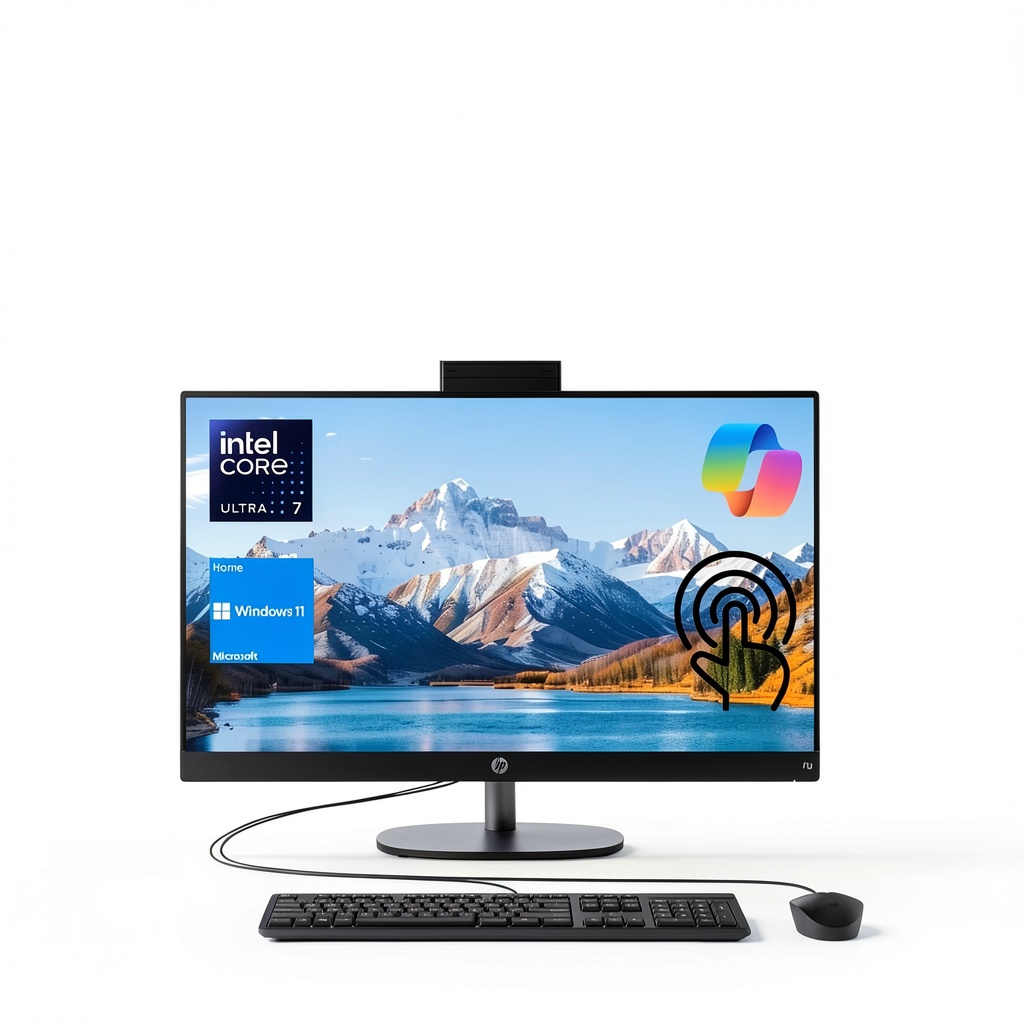
The HP 27-inch Touchscreen All-in-One is positioned as a premium solution for modern workspaces. It consolidates a capable computer into the back of a large, vibrant display, aiming to eliminate the clutter of a separate tower. The heart of the system is Intel’s Core Ultra 7 255U processor, a modern chip with a hybrid architecture designed for efficiency and performance. Paired with a substantial 32GB of RAM and a spacious 2TB NVMe SSD, this machine is built to handle demanding workloads without slowdowns.
| Specification | Details |
|---|---|
| Processor | Intel Core Ultra 7 255U (12 cores, 14 threads, up to 5.2 GHz) |
| Memory (RAM) | 32GB DDR5 |
| Storage | 2TB NVMe SSD |
| Display | 27-inch Full HD (1920×1080) IPS Touchscreen |
| Graphics | Integrated Intel Graphics |
| Connectivity | Wi-Fi 6, Bluetooth, USB-C, USB-A, HDMI, Ethernet |
| Operating System | Windows 11 Home |
| Included | Wired Keyboard & Mouse |
Real-World Performance & Feature Analysis
Design & Build Quality
The first thing you’ll notice is the clean, professional aesthetic. The thin bezels on three sides maximize the screen real estate, while the stand provides a surprising amount of tilt adjustment. In a real office environment, this is crucial for reducing glare. The build feels solid—no creaks or flex—which is essential for a device that might be frequently touched and adjusted. The back houses all the ports in an easily accessible layout. However, the stand only allows for tilt; there’s no height adjustment or rotation into portrait mode, which could be a limitation for some ergonomic setups.
Performance in Real Use: Beyond the Benchmarks
Specs like “12 cores” and “32GB RAM” sound impressive, but what do they mean day-to-day? I pushed this system through a typical power-user scenario: 25+ Chrome tabs (including a streaming video), Microsoft Teams running, Excel with a large dataset, and Photoshop open for light image editing. The HP All-in-One handled this with effortless fluidity. Application switching was instant, and there was no lag or stutter. The 2TB SSD is a standout; it’s not just about booting Windows in seconds, but about having ample space for years of projects and files without needing an external drive cluttering your desk. The Core Ultra 7’s efficiency cores handle background tasks silently, making the system remarkably quiet even under load—a huge plus for focus work.
The Touchscreen: Convenience or Gimmick?
I’ll be honest: I was skeptical. On a desktop, a touchscreen often feels redundant. But in practice, I found it genuinely useful in specific situations. Zooming in on complex spreadsheets or PDFs with a pinch is faster than fiddling with a scroll wheel. During a presentation, tapping to advance slides feels more natural. It’s also great for casual use—scrolling through news sites or photos while standing. However, it’s not a precision instrument. For detailed photo editing or CAD work, you’ll still want your mouse. Think of it as a convenient secondary input method, not a primary one.
Ease of Use & Setup
This is where the all-in-one form factor shines. You literally need to plug in just one power cable. The keyboard and mouse are included and pre-paired. Within 5 minutes of unboxing, I was going through the Windows 11 setup. For small businesses or non-technical users, this simplicity is a massive advantage over building or configuring a traditional PC. The Windows 11 interface is clean and works well with touch, and the system comes free of excessive bloatware, which is a welcome surprise.
Durability & Reliability
HP has a strong reputation in the business sector for a reason. This all-in-one feels built to last. The components are quality, and the thermal design keeps everything cool during prolonged use. From a reliability standpoint, the lack of moving parts (aside from the SSD) compared to a tower PC is a benefit—fewer points of failure. The main long-term consideration is the non-upgradeable RAM. While 32GB is ample today, it’s the one component that might feel limiting in 4-5 years for the most demanding users.
Pros & Cons
Pros:
- Outstanding Multitasking: The 32GB RAM and fast CPU eliminate slowdowns when running multiple applications.
- Clean, Clutter-Free Setup: A single cable design transforms your desk aesthetics.
- Useful Touch Interface: Adds a layer of convenience for navigation and presentations.
- Fast Storage: The 2TB SSD ensures quick boot times and ample space for files.
- Quiet Operation: Stays whisper-quiet even during demanding tasks.
Cons:
- Limited Upgradeability: You cannot upgrade the RAM or CPU down the line.
- Integrated Graphics: Not suitable for gaming or professional-grade creative work.
- 1080p Resolution on a 27-inch Screen: While fine for most tasks, some users may prefer a sharper QHD display for text clarity.
- Premium Price: More expensive than a tower PC with comparable internal specs.
Comparison & Alternatives
To put the HP All-in-One’s value in perspective, it’s essential to compare it to other options on the market.
Cheaper Alternative: Standard Desktop Tower with Monitor
For several hundred dollars less, you could assemble (or buy a pre-built) desktop tower with a Core i5 processor, 16GB RAM, a 1TB SSD, and a separate 27-inch monitor. When to choose this: If your budget is the primary concern, you need future upgradeability (like adding a dedicated graphics card), or you simply don’t value the all-in-one form factor. You sacrifice the sleek design and touchscreen for better long-term flexibility and lower cost.
Premium Alternative: Apple iMac 24-inch with M3 Chip
Priced similarly or slightly higher, the iMac offers a stunning 4.5K display, a incredibly sleek design, and the performance-per-watt of Apple’s M3 chip. When to choose this: If you are deeply invested in the Apple ecosystem, require a top-tier display for photo editing, or prioritize absolute silence and minimalist design. However, you’ll be limited to macOS, and the base model comes with only 8GB of non-upgradeable RAM, making the HP’s 32GB a significant advantage for multitasking.
Buying Guide / Who Should Buy
Best For Beginners & Non-Tech-Savvy Users
This is an excellent choice. The simplicity of a single device, with everything included, removes the intimidation factor of PC setup. The touchscreen can also make the computer feel more intuitive to use for those less comfortable with a mouse and keyboard.
Best For Professionals & Power Users
Business users, data analysts, accountants, and anyone who lives in spreadsheets, email, and presentation software will find this machine ideal. The combination of strong multitasking performance and a large screen is perfect for managing multiple windows. The professional look is also a plus for client-facing home offices.
Not Recommended For
Gamers: The integrated Intel graphics are not designed for modern gaming. High-End Creative Professionals: Video editors, 3D artists, and engineers working with CAD software need dedicated GPUs and often higher-resolution displays. Hobbyist Tinkerers: If you enjoy upgrading your PC components piece by piece, the closed nature of an all-in-one will be frustrating.
FAQ
Q: Is the 1080p resolution on a 27-inch screen sharp enough?
A: For text-based work, spreadsheets, and web browsing, it’s perfectly adequate. The image is clear. However, if your primary use case involves detailed photo editing or you simply prefer a crisper image, you might find a QHD (2560×1440) display preferable. It’s a trade-off for the overall package at this price point.
Q: Can I connect a second monitor to this all-in-one?
A: Yes, it has an HDMI-out port, allowing you to extend your desktop to a second monitor, which is great for expanding your workspace even further.
Q: Is the RAM upgradeable?
A: No, the 32GB of RAM is soldered onto the motherboard and cannot be upgraded after purchase. This is why it’s crucial to buy the configuration you’ll need for the foreseeable future.
Q: With the Intel Core Ultra 7, is this good for video conferencing?
A: Yes, very. The processor includes AI-powered features that enhance video and audio quality on calls, providing better noise cancellation and background blurring in apps like Teams and Zoom.
Q: Is this HP All-in-One worth the price compared to a laptop?
A: That depends on your need for portability. If you never plan to move your computer, an all-in-one like this typically offers more performance for the money than a similarly priced laptop and provides a much larger, more comfortable screen. If you need to work from different locations, a laptop is the only practical choice.

 OM System M.Zuiko 17mm f/1.8 II Lens Micro Four Thirds